






• Home
  • Video creation
Three women smiling at a laptop while creating videos together.

All-in-one video creation platform

Create, record, edit, and share videos in one platform—built for classrooms, teams, and creators who need more than basic tools.

Create, edit, and share video all in one platform

Tired of juggling separate tools for video trimming, lighting enhancement, captions, and audio adjustments? Beyond just a tool, WeVideo is a dynamic all-in-one video creation platform that makes it easy to create, edit, and scale content all in one place. 
Corporate team working together on a desk and around one laptop computer.

Everything you need to create — without switching tools

Trim, merge, flip, crop, resize – do whatever you need to create the perfect video, without the endless steps. Want to add text, music, and transitions? How about customizing green screen backgrounds or ready-made templates within the same video creation software? All sounds good to us!
Dive into video editing

Quickly record engaging demos, tutorials, classroom lessons, and team updates from your home screen using our screen recorder! You can also have a convo with yourself, but we don’t recommend it.
Start recording

No more passive learning with WeVideo's interactive video tools! Insert web embeds, polls, auto-generated questions, quizzes, reflective pauses, and more to fuel outcomes for learning, training, or courses.
Drive engagement in every video

Nurture learning outcomes with robust analytics tools designed to guide understanding, track performance, and identify learner gaps. Make data-driven decisions that drive high-quality content with the engagement to prove it.
Boost engagement with data

Stand out from other brands with company-approved content that you can create once and scale forever. WeVideo's Brand Kits and customizable pro templates help you make on-brand videos that represent you without the time-cost or workload. Did we mention we've also got real-time collaboration tools for multiple users to maximize?
Make branded videos
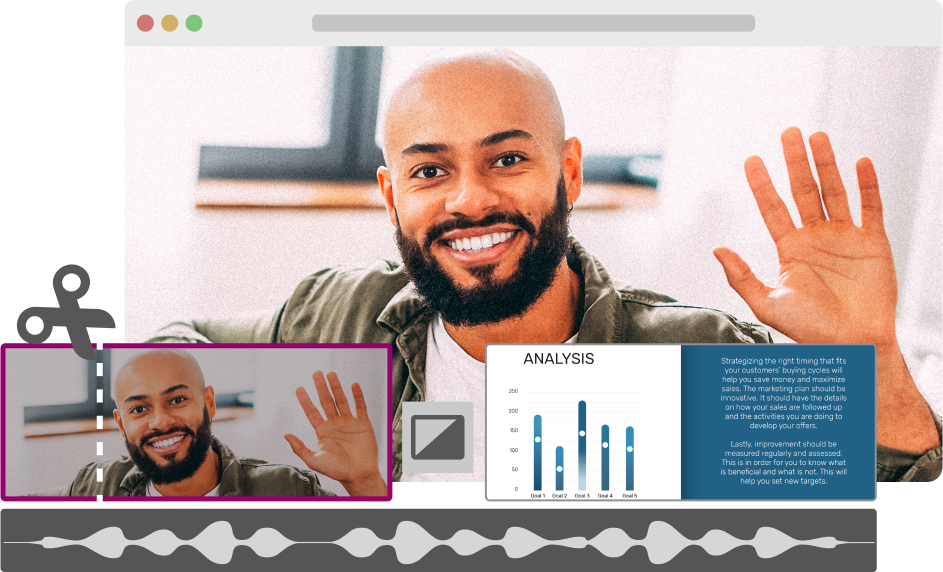
Graphic illustrating how to create videos with example UI elements from the WeVideo interface.

Video creation for any audience using one platform

Smiling elementary school student learning by video in front of a laptop.

K-12

If one thing is true about education today, it’s that teachers have to make every moment count. Meet diverse learner needs for a wide range of ages and stages using our video creation platform for classrooms. Empower the next generation of critical and creative thinkers with powerful analytics tools and interactive features designed to activate learning.

Learn more
Two college students collaborating on video creation in front of a laptop in a library.

Higher ed

Drive better asynchronous learner engagement through intentionally designed courses and trainings via modularized content, branched learning, and more using our all-in-one video creation software.

Learn more
Two professional colleagues viewing video content on a laptop in a modern office.

Business

Train and retain teams, enable sales, reduce support call overload, streamline internal comms, and more. Whatever your goals, simplify video creation and workflows that prove success outcomes every time.

Learn more

A cloud-based video creation platform for any device

An all-in-one video creation platform accessible on any device? It's true! Video creation should be that easy. Simply log in from your Mac, Windows, Chromebook, iOS, or Android and get creating! Our browser-based video creation software safely stores your content in the cloud to revisit any time.
Team working together on two laptop computers.

Streamline video creation with built-in AI

Short on time? Meet your new best friend — WeVideo's AI Assist, a dynamic suite of tools designed to save you time, boost efficiency, and deliver high-quality content in a matter of minutes. AI-generated captions, auto-generated questions, background noise reducer? Yes, yes, and yes.

WeVideo's AI assist banner against gradient purple background

What our customers are saying

"I teach with projects, and WeVideo is an excellent platform for students to work collaboratively on video projects. While most teens have some ideas about video from their cell phones, WeVideo takes their creativity and skills to a whole new level, allowing them to fund their voice in new and exciting ways."

Peter De Lisle Academic Director at Inanda Seminary

"We've had students put themselves in their own dioramas and talk through their projects using green screen effects."

Kirsten Hood Coordinator of Campus Instructional Technology at Frisco ISD

"WeVideo is a truly innovative and highly effective solution that has been surpassing all expectations for the entire learning and innovation design team since the day we integrated the platform."

Maikel Right Online Associate Director of Instructional Technology, Florida International University

"WeVideo is the perfect balance for my needs. It has every feature I require without the unnecessary complexity of other editors, making it a great fit for my projects."

Ken Walker, PhD Founder of Vegan Rise One

Why choose WeVideo as your video creation platform

Make interactive videos every time Make interactive videos every time

Increase how much viewers engage with and remember from your videos by using interactive elements like multiple choice questions, polls, and fill in the blanks — without juggling tools.

Designed for classrooms and teams Designed for classrooms and teams

WeVideo is built for real workflows, not just one-off videos. Gather and use real-time data for classrooms and business to make near- and long-term decisions about future lesson plans, training content, remediation, and more.

Create branded videos Create branded videos

Create a Brand Kit and branded templates in WeVideo. That way, everyone (Todd from HR, is that you?) can make on-brand video content, no matter who’s making the videos. Plus, branded videos make it easy to create once and scale.

Create from anywhere Create from anywhere

WeVideo is available on Mac, Windows, Chromebook, iOS, and Android. Edit from home, work, Starbucks, an interdimensional blip in the fabric of the universe – we’re flexible.

Frequently asked questions about video creation

WeVideo's video creation platform makes it easy to create your own videos for ads, social media, product demos, curricula, and so much more. Our browser-based video creation software lets you create anywhere you've got internet and from any device. Simply:

  1. Log in to WeVideo to start a new project.
  2. Upload your media or snag from our 1M+ stock media assets.
  3. Customize with dynamic transitions, background tunes, text, filters, and more.
  4. Select your preferred resolution, then download and share!

No professional tech experience needed here! Create your own videos with WeVideo's all-in-one video creation software by uploading your video clips or selecting from ours instead. Drag them to the Timeline, then edit as you see fit with background text, music, transitions, and more. Then export and done! Your content is always securely stored in the cloud to revisit or repurpose any time.

WeVideo's free plan lets you access some key video editing features including picture-in-picture, screen and webcam recording, copyright-free assets, and more. For unlimited storage and publishing time as well as watermark-free content, WeVideo offers a variety of plans to suit your video creation needs.

With WeVideo, yes! Why juggle multiple tools when you can create your own video with everything in one place? You can:

Create, edit, and share for any use case — all in one place.

Yes! WeVideo's all-in-one video creation software is stacked with interactive video tools designed to boost engagement, performance, and retention. Add multiple-choice, free response, fill-in-the-blank, quizzes, web embeds, and more to any video, then bring it to any learning environment to drive engagement every time.

Absolutely! WeVideo's real-time collaboration features make it easy for users to create, edit, and provide live feedback. Or, create from anywhere and collaborate asynchronously. Either way, the answer is yes.

Create videos with our all-in-one platform


Turn your ideas into videos

ONLINE VIDEO EDITOR          SCREEN RECORDER          GREEN SCREEN          INTERACTIVE VIDEO


VIDEO TRIMMER          VIDEO MERGER          ADD TEXT       ADD MUSIC


MOVIE MAKER         YOUTUBE VIDEOS          VIDEO ADS          VIDEO TEMPLATES