


Over the last 40 years, green screen setups have become a staple tool in film and television productions, and even the most casual filmgoers recognize it and understand that it's somehow related to visual effects.
.webp?width=600&height=338&name=image%201%20(11).webp)
Image via Marvel Studios
In professional settings, green screens are typically housed in large sound stages designed to accommodate them. These studios have tall, wide walls, often spanning hundreds of feet, allowing actors and camera crews to move freely without locking off any shots.
Many studio spaces are large enough to include entire sets, with the green screen setup extending beyond set structures to allow for seamless background and sky replacements when necessary.
.webp?width=600&height=334&name=image%202%20(9).webp) Image via Warner Brothers
Image via Warner Brothers
In addition, professional green screen setups are often equipped with visible tracking markers, which assist visual effects artists later in post-production. Since achieving a good key requires precise lighting, these stages also have dedicated lighting fixtures designed specifically for green screen setups.
Now, if you’re a no-budget or independent content creator, you probably don’t have access to these luxuries. So, what can you do in this situation? In this article, we'll explore efficient DIY green screen setups, tips, and ways to create without sacrificing quality (or your wallet).
Rotoscoping and compositing
In visual effects, it’s often necessary to composite an actor from their original sequence to insert them into a different location. Alternatively, additional elements may need to be added to a scene that couldn’t be present on set due to budget constraints or practicality, and more often than not, this item has to sit behind the actor within the frame.
For the actor to be composited effectively, a visual effects artist must perform a thorough process called rotoscoping. This involves using digital software to trace the outline of an actor and, frame by frame, adjust the created mask to isolate them from the original film sequence.
For example, let’s look at this image in Adobe After Effects, and let’s say that the producer wants this shot to take place in a construction yard instead.
.webp?width=600&height=338&name=image%203%20(11).webp) We would then need to create a mask point alongside the edge of the truck and the man for every frame!
We would then need to create a mask point alongside the edge of the truck and the man for every frame!
.webp?width=600&height=338&name=image%204%20(9).webp)
Given that the actor has ridges in his jacket and raises his arms in and out of the truck, the number of keyframes needed becomes astronomical. Likewise, if the actor has flowing garments or long hair, this process becomes even more challenging. Add to that the motion blur from shooting at 24 frames per second, and if the shot lasts for 10 seconds, for example, that’s at least 240 frames that an artist has to rotoscope individually.
This illustrates how the process quickly becomes inefficient for longer or more complex sequences. However, technological advancements have made this process easier with the likes of Rotobrush, an AI-powered tool from After Effects that allows you to select a single area of a subject, and then After Effects should automatically highlight the entire subject—but the results are not always that great.
This is where a DIY green screen equipment becomes pivotal. Instead of tediously keyframing and tracing an actor through every movement, a green screen allows visual effects to use chroma keying.
Using chroma keying for DIY green screens
Chroma key is a classic VFX technique that removes a specific color from a shot so that another background or element can be inserted. You might be thinking of the weather reporter right now. Yep, that’s chroma key in use.
.webp?width=600&height=338&name=image%205%20(5).webp) Image via Fox News
Image via Fox News
With the color isolated, specialist software will make that area transparent (link a PNG), allowing you to place new backgrounds, objects, environments, or effects. The blend of the composite is where the artistry comes to life!

Green screens serve a wide range of purposes in feature films and television. While they can be used for smaller tasks, like placing a green screen on a computer monitor to replace it with specific information later. The primary use of larger green screens is for backdrop extensions.
.webp?width=600&height=451&name=image%206%20(5).webp) Image via Paramount Studios
Image via Paramount Studios
This is often because the cast and crew are filming in a studio but need to create the illusion of being on location. Alternatively, they might be filming on location but need to give the impression of a different geographical setting, such as shooting in Texas, but need to suggest a mountainous region elsewhere in the U.S.
Learn more about the chroma key process in our comprehensive guide to using a green screen.
Using the WeVideo editor to key out a green screen is extremely straightforward:
- Add green screen footage to the timeline.
- Select "Edit" and choose "Keying."
- Use the color picker tool to select the green area in the preview window.
- Adjust key sensitivity and refine edges by de-fringing.
- Add a new video track and place background footage underneath to complete the composite.
Follow the video below to edit green screen footage in WeVideo:
Green screen equipment
So, we’ve covered the core principles of a green screen and why it’s used. Now, the question is, how can a new filmmaker or someone working without a big budget incorporate a green screen setup into their projects?
As you may have noticed, most aspects of filmmaking aren’t cheap. From $500 memory cards to $8,000 tripods, there’s an expensive version of almost everything, often making the budget alternatives seem worthless by comparison!
However, regarding the DIY green screen, we’re happy to tell you that the budget options work just as well as the pricier ones. Let’s review the options available.
DIY green screen: YouTube starter kits
Perhaps the most accessible and straightforward option is the starter kit, often called the “YouTube Kit,” which you can easily find on sites like Amazon. These kits are popular with entry-level YouTubers who want to create fun content at home and need a basic green screen studio. The kit is priced between $100 and $150 and includes a green screen sheet, basic lights, and a backdrop stand.
.webp?width=600&height=606&name=image%207%20(3).webp)
Image via Amazon
However, considering how many tools are bundled in this package at a low price, it’s fair to say the quality may not be top-tier. The green screen setup might have imperfections, the lights may vary in color temperature and lack intensity, and the stands may not be sturdy. That said, filmmakers have achieved a lot with less. If this is all available to you, it’s a solid starting point. Just be mindful of the potential challenges that come with it.
Portable green screen studio
One of the most common, accessible, and affordable options is the portable green screen setup. These collapsible tools work similarly to 5-in-1 reflectors; they can be stored as a small circular disk and then quickly pop open to a sizable green or blue screen (often with one color on either side).
.webp?width=600&height=338&name=image%208%20(3).webp)
Image via Lewis McGregor
Portable green screens are ideal for those working with limited budgets. They’re easy to transport between indoor and outdoor locations without the hassle of moving heavy stands or rigs. Best of all, they’re typically available for around $50.
.webp?width=600&height=338&name=image%209%20(2).webp)
Image via Lewis McGregor
One thing to note with the portable green screen is its size. While the compact size makes it easy to transport and store, it limits the shots you can capture. For instance, using a wide-angle lens with an actor waving their arms might result in parts of their arms extending beyond the edges of the green screen. In this case, it’s best to use a tighter focal length to keep the actor well-framed against the green backdrop.
This green screen setup often means using a locked-off shot on a tripod and keeping the actor relatively static. However, if you need the actor moving through a scene—like walking down a street while requiring a green screen for compositing digital elements behind them—a portable green screen setup offers the flexibility for an assistant to walk alongside, keeping the green screen in position.
.webp?width=600&height=338&name=image%2010%20(2).webp)
Quite like 5-1 in reflectors, portable green screens can be a hassle to collapse if you don’t know the technique correctly. Therefore, practice putting the DIY green screen away before your day of filming. Here’s a handy tutorial from Tara Arts Studio on how to fold one.
Green screen sheets
Consider picking up green screen muslin sheets if you need something larger but within a budget-friendly range. These green screen sheets typically cost between $50 and $100 and are available in sizes around 9 by 10 feet or even up to 9 by 20 feet.
The larger size lets your subject stand on the green screen, providing greater flexibility for framing longer shots, especially for compositing the subject into a location. This green screen setup also enhances realism, making it easier to integrate full-body movements naturally into the scene.
.webp?width=600&height=600&name=image%2011%20(3).webp) Image via B&H
Image via B&H
However, using a green screen sheet or even a green screen paper roll will require an additional backdrop rig with a heavy-duty crossbar to hold the sheet securely. This may slightly extend your budget. It’s also worth noting that you may encounter a few specific challenges when working with a sheet. We’ll dive into those shortly.
Fabric sheets
If a dedicated muslin sheet is out of budget but you need something wider or longer than a portable pop-up green screen, consider sourcing fabric from a craft store. These stores often carry large rolls of solid green or blue fabric that you can cut to your desired length.
.webp?width=600&height=401&name=image%2012%20(3).webp) Image via Freepik
Image via Freepik
However, unlike dedicated green screen materials, fabric stores offer a variety of materials, and there are two key things to avoid: shiny fabrics, which will create unwanted highlights from scene lighting, and very light fabrics, which can let light pass through.
When choosing, consider the advantages of heavy versus light fabrics. Heavy fabrics work well because they hang smoothly without additional weights and effectively block ambient light from behind.
However, they’re also more prone to wrinkles, which can cause issues during keying. Lighter fabrics are less likely to wrinkle but may allow light to seep through from behind, potentially creating an unwanted light spill.
DIY green screen with paint
If you have access to a larger space, such as an open garage, a spare room, or a studio, and want to create an extended green screen for greater actor movement and camera flexibility while saving setup time, consider painting an entire wall.
.webp?width=600&height=400&name=image%2013%20(3).webp) Image via Freepik
Image via Freepik
While you can head to any home decor store to pick up green or blue paint, regular paint may not be ideal for chroma keying.
However, a specific video green is available from most production equipment retailers, which is often preferable. This paint isn’t just formulated for a particular shade of green; it’s designed to be non-reflective, preventing unwanted light bounces and specular highlights on the green screen. You need a consistent matte finish, which these specialized paint mixtures provide.
.webp?width=500&height=500&name=image%2014%20(1).webp) Image via B&H
Image via B&H
This video from Video Alchemy highlights the issues with using standard household green paint to create a green screen wall.
The primary drawback of video paint is the cost. This can be an expensive DIY green screen option for around $110 per can. Likely needing a few gallons, the cost will vary based on wall size and the number of coats. However, it may be cost-effective considering the time saved from not having to constantly set up, light, take down, and store a green screen backdrop.
Green screen craft board
Consider buying a craft foam board from a store for smaller green screen applications, such as compositing miniatures. While these foam boards come in various colors, choose one with a solid, uniform color—ideally green—but make sure it’s matte and non-glossy.
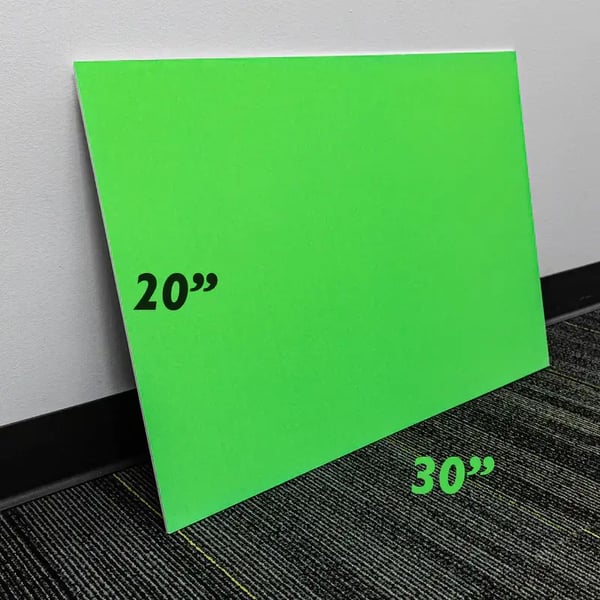
Image and product from Bazic Store
Avoiding reflective or glossy surfaces is crucial in any DIY green screen setup. The material should absorb light rather than reflect it to prevent unwanted highlights that could complicate the keying process.
3 guidelines for filming on a DIY green screen
There are a few essential guidelines to follow when using your own green screen studio.
1. Illumination
As the software needs to key out a single color from the green screen, it’s essential to ensure the screen is illuminated evenly. If one area is slightly darker or brighter than another, the luminance values will shift, making parts of the green screen appear lighter or darker. This variation can create challenges during the keying process.
It’s best to dedicate a separate set of lights solely to the green screen for even lighting. A good starting point is a three-point lighting setup without creating a fill light (one light less intense than the other): place a light on either side of the green screen and at least one additional light from below to ensure uniform brightness. The number of lights needed may vary depending on the type of screen, whether it’s a pop-up, a muslin sheet, or an entire green-painted studio space.
You also want to avoid light from the green screen spilling onto the actor. This can create a “green spill” effect, wrapping unwanted green light around the subject and complicating the keying process. Position the actor at least six feet away from the green screen to prevent this.
Lastly, ensure all lights have the same color temperature and produce a consistent hue across the screen. Different lights, even if they look similar, can have varying CRIs (Color Rendering Index), which affect how accurately they emit color. If you use lights with different CRIs or color temperatures, the green screen may look fine on set, but subtle discrepancies in hue can cause issues when pulling the key in post-production.
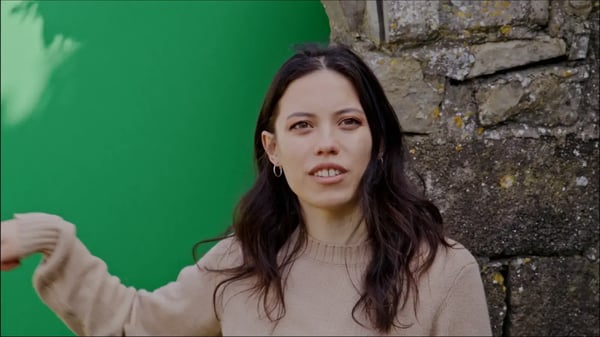
Avoid casting shadows on the green screen if filming outdoors, as seen in the example image below.
2. Creases
When working with any fabric-based green screen equipment—whether a collapsible screen, a muslin sheet, or fabric from a craft store—be cautious of creases from storage. Even the smallest crease can create a subtle shadow on the green screen, disrupting the uniformity of the color. Be sure to flatten all creases before you start filming.
3. Shallow depth of field
You will also want to avoid using a shallow depth of field when filming against a green screen. Deep focus is essential for maintaining clarity between the subject and the green screen.
With a wide open aperture, the edges of the actor, or even their hair, can fall slightly out of focus, causing blur around the edges, which can interfere with pulling a clean key. Additionally, shallow depth of field can lead to color fringing or chromatic aberrations in lower-quality lenses, further complicating the keying process. The goal is to keep the green background as clear and uniform as possible.
Why are green screens green?
After all this, you may still be wondering, Why are green screens green? Ultimately, this color best works for human skin tones. In other words, there are no green tones similar to that of a human skin tone, therefore making it easy for backdrops not to clash with the subject(s). It is also less likely to appear in clothing or other on-screen elements.
That said, to make things more interesting, green screens aren't the only color used for green screens. Bring on...the blue screen!
What are blue screens?
Let’s touch on blue screens, as they've been mentioned a few times in this article. You might have noticed in behind-the-scenes footage that filmmakers sometimes opt for a blue screen instead of green.
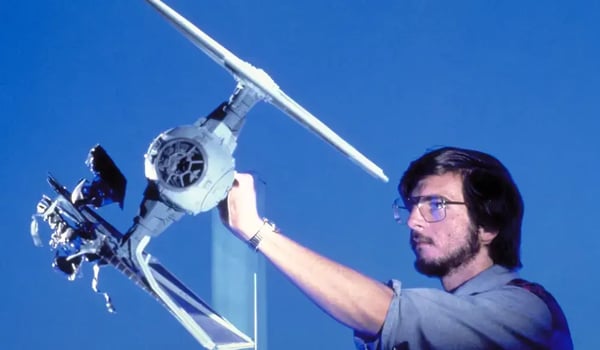
Image via LucasFilms
Is there a difference? Yes, but it’s not because blue screens perform differently from green screens. Though, technically any solid color could work—since chroma keying will still isolate and remove that color from the scene—when a blue screen is used over a green screen, it’s usually for a few specific reasons.
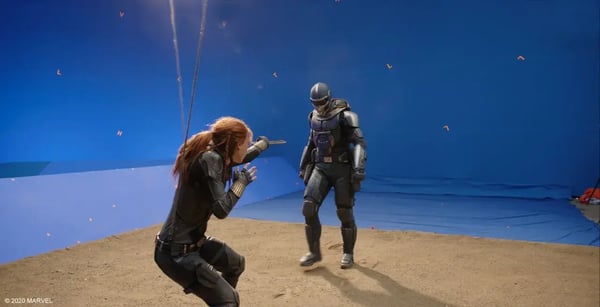
Image via Marvel Studios
In the days of film stock, blue emulsion was more responsive, making blue screens a better choice. For exterior shots or studio sets replicating outdoor locations, green screens can clash with natural elements like grass, causing issues with keying. In these cases, a blue screen avoids these conflicts.
Additionally, for night scenes, blue screens tend to work better because they reflect less light than green, reducing light spill and color contamination, and they hold up well in lower-light settings. Once you start using one, it'll be natural to incorporate the other for diverse video projects.
Mastering DIY green screen setups
While green screen setups are often considered tools for the major players, independent creators and low-budget filmmakers now have plenty of accessible options for achieving quality results. The real skill lies in effectively compositing live footage with background extensions during post-production.
To get started on your post-production adventure, sign up for WeVideo to use the built-in chroma key tool. We can't wait to see your next best DIY green screen project!