


Gone are the days where music video production is reserved for big-time Hollywood artists. In an anything-can-go-viral society, new music videos are released on the regular.
Knowing the ins and outs of music video production can help you decide how to make your own music videos while increasing the odds of their success. Adding music to a video can be a daunting task and requires creativity and finesse.
In this article, we will discuss how to make your own music video without the costly equipment or production. Let's get right into it.
|
Inside this article: |
How to make a music video
Making a music video for social media, brand promotion, or to simply showcase your talent? You've come to the right place. With WeVideo's dynamic video editing and creation platform, you can make your next viral video in just a few steps:
- Open up a new project.
- Upload media footage or select from our 1M+ stock media assets.
- Add music tracks, record a voiceover, or both.
- Edit with text, transitions, filters, and whatever fits your vision.
- Export in your preferred resolution and share directly to social or wherever you need.
Yes, it's that easy!
Step-by-step music video production process
Before you begin, here are some tips to set yourself up for a successful music video production process.
1. Plan your concept and storyboard
When making your own music video, the first thing to think about is the concept. This can include an animated video, a live-action video, a drawing, a short film, or pretty much any other graphic design element. Any story you tell will play a huge role whether you’re working on your marketing automation or a completely new campaign.
You may also consider doing something completely different from anything else done before by other bands and musicians, meshing together different types of videos to create a unique result.
Then, create a storyboard consisting of different scenes with this idea/story. This will help you see your story from a different perspective and give you an idea of how you can translate it into visuals.
In addition, while still in the early stages of this process, knowing how to add music to a video will help you better understand how the two should work together.
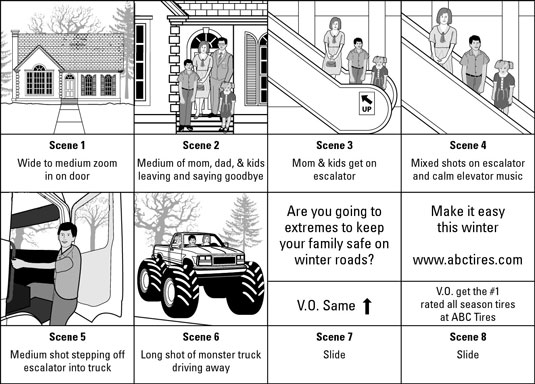
Source: http://dummies.com
Starting with a storyboard will also save time and effort in the post-production stage.
It would help if you also looked at exceptional examples of promotional videos because they know how to hook the audience from the beginning.
While you are not necessarily selling something tangible in your video (though some might argue that you would be selling yourself), getting someone's attention and keeping it is one of the main goals.
If your video involves a script, then here’s another resource to check out when it comes to writing a great script.
2. Build the right production team
A music video team is usually made up of a director, animator, and designer. The director will take care of the overall structure and ensure that the video matches the music’s vibe. At the same time, the animator (depending on the video style you’re going for) creates different scenes that match what you envisioned in your storyboard.
The best idea is to find a team with experience in creating promotional videos because they already know how to get people interested in watching them online. If you're lacking a substantial budget, you can always look on sites such as Upwork, where video professionals are looking for projects to work on.
However, be aware that it might not always be the best idea to hire the cheapest team. Instead, you could receive quotes from different music video production companies and compare them before making a decision based on the quality of their previous work.
If you want to go over and above the main essentials when it comes to choosing your team, you can also hire a company that will handle your music video promotion. This way, you can concentrate on the creative side while leaving the marketing up to the professionals.
3. Choose locations and equipment
Choose a location that goes along with the theme of your storyboard/song lyrics, and consider how much money you have at hand to spend. For example, if it's summertime, go for a beach or park setting instead of filming inside an expensive studio space.
When you are shooting footage, make sure to film extra content you can use during the post-production stage. Avoid having empty spaces in shots because afterward, they will somehow need to be filled, which takes more time, effort and money. As long as people can follow the story, you can always insert additional details in post-production.
Keep in mind that the video equipment you are using will also affect the overall quality of your film. If you're working with a limited budget, try to find equipment that is affordable but still produces high-quality results.
Getting started with video equipment is easier than ever, and with the right tools, you can create a film that looks professional and polished.
4. Capture high-quality audio
What would a music video be like without proper audio? While having a professional team is nice, you actually don't need one to create high-quality audio. Thanks to music video production tools like WeVideo, you can easily adjust volume levels, create sound effects, add motion titles, insert transitions, and more in minutes.

Source: http://sheffieldav.com
If you're not sure where to begin, consider asking or hiring someone who has worked on similar projects or with companies within your industry space. This way, you will know what quality to expect from them when everything is set and done.
5. Edit your footage
Once you have collected all of your footage, it's time to begin editing. Show the first cut of the video to a few people in your target audience whose tastes are similar to the audience that will watch your video. Their opinion will matter both in the short and long-term so definitely consider what they say.
Then, make small changes based on their feedback. If needed, keep showing them different versions until they are delighted with what they have seen. Remember that you are not obligated to change anything, but at least you will know which parts need more work so that the final version has a more significant impact on the public.
When editing, knowing how to do essential functions such as increasing the speed of specific parts or even slowing down the video is critical. This supports highlighting the most important elements of your storyboard and ensures that your message gets through to the viewers.
You should also try to make use of the right graphic design elements and sound effects on some parts of your video because they can help create a more intense atmosphere and guide viewers towards an accurate understanding.
If applicable, you could always include subtitles to give people an idea of what is being said in different languages.
6. Add music, effects, and final touches
The right music and sound effects will make a huge difference in giving life to your story and boosting its performance.
Depending on the nature of your project, this music might have been chosen at a previous stage. In that case, just go over it again to ensure that it suits the visual portion of your video. Keep in mind that music should enhance and support what you're trying to convey, not just random background noise.
Pick music that doesn't distract the viewer's attention because it should help them feel the emotions that you’re trying to elicit. The music you choose should also not take away from the other elements such as visuals and plot.
Here are three ways to easily add music to your online video that will surely make a difference in the final result.
7. Publish and promote your video
If you're self-publishing and self-promoting your video, you might want to start with a few different social media networks like Instagram, Facebook, or TikTok where your target audience might be.
Knowing the various marketing automation settings to consider when publishing on various platforms is important as this will ensure that your video can be seen at its best.
When it comes to promotion, Facebook, Instagram, Twitter, and YouTube are always good ideas, but it's also important to try something new every once in a while. As long as they have the same type of audience that you're targeting, there is no harm in trying different methods and gathering valuable feedback as a result.
You can also use these as an essential part of your content marketing as well as brand awareness processes. A great way to see if you've hit your target with any social media platform is to check how many likes/shares/comments your video received within the first few days/hours since its publication. If the number is too low, consider switching platforms until you find one on which it performs well.
If you have multiple videos, something that can help with promotions is having an outro that will skyrocket views. This will keep people more engaged, grow your brand and lead people to the next video in line.
For example, suppose you have a dance video published earlier this year, and you just finished taping another one with the same crew before summer ends. In that case, in the new video, you could include an outro that leads people to watch the older one.
When it comes to promoting your music video, you can also create video ads that will help increase viewership. By targeting the right people, you can significantly improve your chances of getting more people to watch your video. Just make sure that the video ad is high quality and interesting enough to keep people's attention.
8. Test and improve performance
As with any marketing plan, split testing is beneficial because it will tell you exactly which parts/aspects of your video people enjoyed the most, while identifying the parts of the video where viewership drops off. This will give you a chance to create better videos in the future.
Source: http://instapage.com
There are many different ways that you can conduct this type of testing:
- Try posting different parts/versions of your video at different times (schedule them depending on how many views and engagement they usually get)
- If possible, use a slightly different version of the chosen music
- Use A/B split testing tools to send people to different video pages on your website and see which video gets more views.
Making your own music video is easy with WeVideo
To wrap up, understanding music video production is the first step to making a music video. Don't be afraid of using different styles or techniques for a more edgy or modern vibe. While trying new things might turn some people off, you would never know what you can achieve with your music videos unless you try.
Finally, while we made these tips with music videos in mind, know that they can be applied to any type of movie or video that you wish to create.